Category: Student Engagement

  • Free The Children: My Students Are The Change

    Since attending my first We Day in Vancouver this year I have been amazed by all the people at Free The Children and their sister organization MeToWe.  Everything about the organization from the top down to the bottom is solely focus on creating opportunities for students around the world to be become aware of local and global issues, and to take action.  They do this with an adrenaline charged message that is impactful and long-lasting to our youth.

    Free The Children make it easy for educators to create awareness and encourage students to stand up and speak out.  The educator resources can be used in many subject areas including social studies, health and career education, mathematics, and language arts.  The lesson plans are ready-made, easy to follow, well prepared, and are easily adapted or modified.  If that isn’t enough, when you contact Free The Children they will connect you with a highly motivated program coordinator who is well-educated, knowledgeable, great with students, and ready to assist the delivery of Free The Children’s message to your classroom/school whenever you need them.  Program coordinators have offered resources, small group sessions, presentations in assemblies, and support to students in delivery of the program.

    A Calendar of Action

    Throughout the school year Free The Children have carefully created opportunities for youth to become more aware of local and global issues around the world.  Most of their campaigns centre around creating awareness around Children’s Rights. Here’s a brief list of awareness campaigns:

    Here’s how We Day Vancouver and  Free The Children inspired two grade 5/6 classrooms at Central Elementary Community School in Chilliwack, British Columbia to BE THE CHANGE!

    Halloween For Hunger at Central Elementary Community School:

    • Instead of, or as well as, collecting candy on Halloween, students collected non-perishable foods items to donate to the local food bank
    • We set a goal of collecting 200 items of non-perishable food
    • Students used their social networks to get the message out
    • They told their friends and family members
    • They distributed flyers informing the community of their actions
    • They dressed in costume and collected with care
    • We collected over 630 items of non-perishable food
    • We smashed our goal!

    [youtube=http://www.youtube.com/watch?v=EFNdJi8Ex68]

    Vow Of Silence At Central Elementary Community School:

    • Students went silent for the day in support of all children around the world whose Rights are violated
    • They arrived at school with tape over their mouths, with homemade badges, and colourfully designed t-shirts
    • The rest of the school were shocked by their actions and wanted to know more
    • Both grade 5/6 teachers structured their day to honour all participating students
    • The day was a complete success with many students remaining silent for the whole day.
    • The message was clear and well understood.  Children’s Rights should always be followed and never taken for granted

    [youtube=http://www.youtube.com/watch?v=8HVtOUf_Gz8]
  • The Living Library Project: Everyone Has A Story

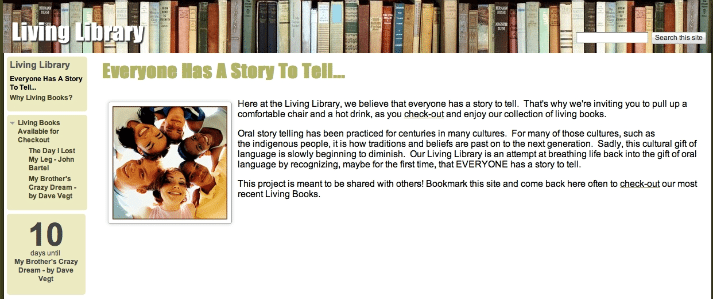
    The Living Library Project is a project designed to improve oral language skills for all grade 5/6 students at Central Elementary Community School in Chilliwack, British Columbia, Canada.  In the next 9 months, we plan to invite living books, local and global community members, into the classroom to tell their stories orally to our students.  Our hope is that through these stories each of our students will realize that they too are a Living Book with a story to tell.

    Oral story telling has been practiced for centuries in many cultures.  For many of those cultures, such as the indigenous people’s, it is how traditions and beliefs are passed on to the next generation.  Sadly, this cultural gift of language is slowly beginning to diminish.  Our Living Library is an attempt at breathing life back into the gift of oral language by recognizing, maybe for the first time, that EVERYONE has a story to tell.

    Goals:

    1. Living Books will introduce students to a variety of worldviews and life experiences
    2. Living Books will help students realize them have stories of their own to tell
    3. Students will use speaking and listening to improve and extend thinking
    4. Students will increase vocabulary usage and oral language skills

    Process:

    We are inviting Living Books, local and global community members, into the classroom to tell their stories orally to our students.  Our hope is that through these stories each of our students will realize that they are a living book with a story to tell.  If you have a story to tell contact us at livinglibrary33@gmail.com.

    This project is meant to be shared with others, just as oral stories have been shared among cultures in our past.  Check out the website often to hear our most recent Living Books.

  • Tech Integration Post # 6 of 10: Skype an Author On The, Before-During-After, Writing Process.

    Skype is a service which allows the registered user to make free phone calls and video calls over the Internet.  This is a free service but both users need to have Skype software downloaded on their computers before the technology will work.  In order to make a phone call you’ll need a microphone to speak into and a pair of speakers to listen to the responses of the person you’re talking to.  If you would like to engaging in video calls both parties will needed a webcam in order to be able to see each other.

    Using Skype in the classroom is not limited to author workshops, when using Skype you can bring a variety of professionals/experts into your classroom at their convenience.  The following link takes you to a list of professionals/experts from around the world willing to Skype in your classroom.

    Also, please take the time to check out this excellent video resource from Silvia Tolisano

    Example: Use an author to help teach your learner’s about the before, during, and after writing process.  I’ve found that whenever you connect your learner’s to experts outside the classroom it enhances the validity of the task/assignment ten fold, and you’re students become more engaged.

    Learning Outcomes: B.C. Grade 6 Language Arts
    A3 – listen purposefully to understand and analyse ideas and information
    A5 – select and use strategies when expressing and presenting ideas, information, and feelings
    B5 – select and use strategies before reading and viewing to develop understanding of text
    C5 – select and use strategies before writing and representing
    C6 – select and use strategies during writing and representing to express and refine thoughts
    C7 – select and use strategies after writing and representing to improve their work

    Here’s a link to all my Skype related bookmarks on Diigo

    Let me know what you think.  If you’re reading this and have used these techniques please feel free to comment or question.

  • Tech Integration Post # 5 of 10: Health and Career Education 2.0

    Grade 5 Health and Career Education Learning Outcome: Safety and Injury Prevention

    C7 – describe safety guidelines to protect themselves and others from abuse and exploitation (e.g., knowing their right not to be abused, being assertive, avoiding potentially unsafe situations, practicing safe Internet use, recognizing tricks and lures used by predators)

    Use a Flip camera, a video camera, a digital camera, or a mobile phone to video small groups of students acting out how to be safe online.  Try these topics or generate your own:

    1. Never hide Internet usage from your parents.  Always let them know when your online
    2. Never reveal personal information such as telephone number, address, last name etc…
    3. Never arrange to meet someone you’ve met online and don’t know, without your parents permission
    4. Cyberbullying
    5. Digital citizenship
    6. Protecting reputations online
    7. Digital privacy
    8. Safe talking in Cyberspace
    9. Handling E-mail and IM
    10. Safe Social Networking

    Your learners may choose a topic and research, in depth, based on the information you’ve share with them or from information they have found independently.  They form a small group of three or four and complete the following tasks:

    • Sketch out a storyboard of the Internet/Online safety skit
    • Create a script of dialogue for the skit
    • Collect any props needed for the skit and practice until comfortable
    • Record the skit and edit using JayCut

    Note: This is a cross-curricular activity and can be used for oral language practice as well as a writing exercise.
    My Diigo links on Internet/Online Safety

    Once your videos are complete your learners can use JayCut to upload and edit them.  JayCut is a free online video editing tool.  There is no longer a need to download expensive video editing software.  You can use JayCut from any computer with an Internet connection and the basic package is free.

    When the videos have been edited by your learners they may be showcased at assemblies or shown to learners in younger grades and used as a teaching tool.  Older grades tend to put more effort into their work when the audience is larger and they know it’s being used for a higher purpose.

    Feel free to let me know how it goes…

  • Tech Integration Post # 4 of 10: Teaching with TED

    TED is a small non-profit devoted to ‘Ideas Worth Spreading.’  It began in 1984 as a conference, bringing together leaders in the fields of Technology, Entertainment, and Design.  The TED website makes a selection of the best talks and performances available to view and download for free.  All of the talks feature closed captions in English, and many feature subtitles in various languages. These videos are released under a Creative Commons license, so they can be freely shared and reposted.  If you subscribe to a news reader such as Google Reader you can also subscribe to new talks here.

    I’ve used TED in the classroom to inspire my learners, to bring attention to important world events, to listen to debates and form opinions, to create and stimulate inquiry, to activate prior knowledge, to offer career and life-skills knowledge, and as a writing prompt.

    The following TED talk is a debate and asks the question, “Does the world need nuclear energy?” It compares the future of burning fossil fuels energy against the possibility of increasing nuclear power production.  Obviously, the vocabulary used in these talks are not necessarily intermediate grade friendly but I feel it serves as a great introduction to a debate writing unit for grade 6, or an introduction to non-renewable resources in covered in B.C. science 6.

    [youtube=http://www.youtube.com/watch?v=UK8ccWSZkic]

    It’s simple to use TED as an engaging way to meet many learning outcomes in British Columbia and beyond.  Here are a few examples which link specific TED talks directly to B.C. learning outcomes:

    B.C. PLO Science grade 5: Earth and Space Science: Renewable and Non-Renewable Resources

    • analyze how BC’s living and non-living resources are used
    • identify methods of extracting or harvesting and processing BC’s resources
    • describe potential environmental impacts of using BC’s living and non-living resources

    B.C. PLO English Language Arts grade 6:

    • Oral Language: A1 use speaking and listening to interact with others
    • Reading and viewing: B9 read and view to improve and extend thinking
    • Writing and representing: C2 write a variety of effective informational writing for a range of purposes and audiences that communicates ideas to inform or persuade


    Why use TED?

    1. It’s real
    2. It’s relevant
    3. It’s current
    4. It connects classroom’s with people making positive change in the world.

    Check it out and let me know what you think.

  • Interactive Whiteboards (IWB): Post 1 of 2

    I’m attending my first IWB workshop on Friday June 18 so I thought I’d compose before and after posts.  Presently I haven’t actually used an IWB in a classroom so all the information is from research I’ve compiled.  Early next week I’ll be able to offer additional information once I’ve completed the workshop.

    I’m convinced that every classroom in Canada will have an interactive whiteboard (Smartboard) installed within the next 5 years.  It is the next evolution of the chalkboard, so you might as well embrace it now.  Is resistance is futile?

    What exactly is an Interactive Whiteboard (IWB)?

    • A large display that connects to a computer and projector
    • The projector projects the computer’s desktop image onto the display
    • Your learners control the display with electronic pens, fingers, or other devices
    • The display is typically wall mounted and is movable

    [youtube=http://www.youtube.com/watch?v=DjdNPMZJbLs]

    As early as 2004, 26% of primary classrooms in the UK had IWB’s.  The BECTA, government agency promoting the use of technology integration in the classroom, completed a two-year study recent and as a result of that research, is working on an expansion plan for IWB in the classroom.

    Pros:

    • Increases student engagement
    • Engaging with material in a different way 1
    • Objects are able to be manipulated in a hands-on way with an IWB i.e. measuring angles in geometry 1
    • Encourage a different, more collaborative kind of teaching 1

    Cons:

    • Not enough training for teachers
    • First year of introduction leads to little/no significant impact on a learner’s academic performance
    • Teacher’s focus more on the technology than on learning outcomes
    • The interactive nature of the IWB can make some relative mundane task take longer than necessary particularly with low functioning students

    It’s time to open up the dialogue surrounding the use of IWB in our classrooms.  What are your thoughts?

  • Tech Integration Post # 2 of 10: Using Google Documents As A Collaborative Classroom Tool

    Use a Google Document spreadsheet to facilitate a collaborative class assignment.

    Example: Social Studies

    Learning Outcome example : B2 – compare Canadian society with the society of another country

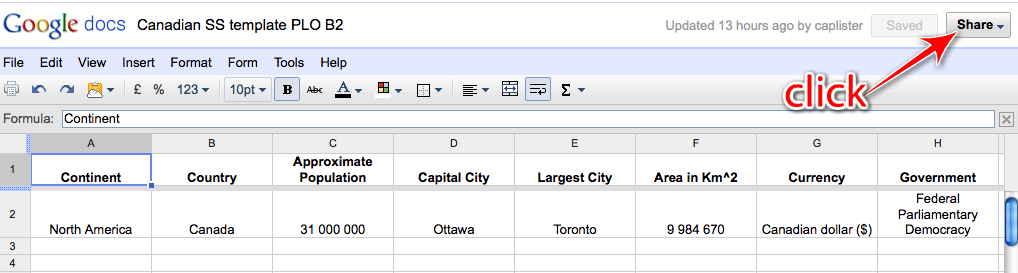
    • Design a spreadsheet which compares Canadian society/culture against other societies/country throughout the world.  See template example Canadian SS template PLO B2
    • This example compares Canadian culture to other countries throughout the world
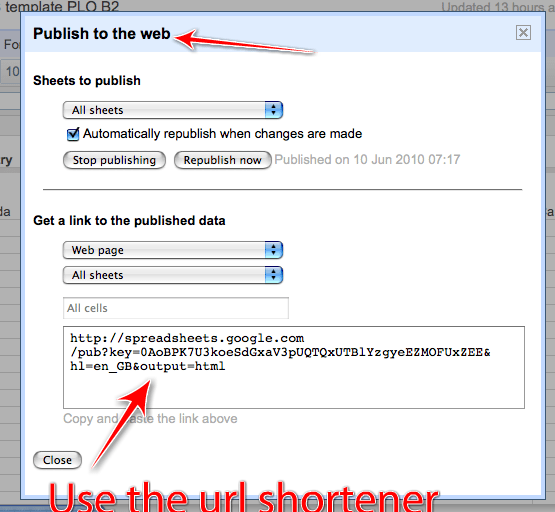
    • Once the spreadsheet is created, publish the document as a web page.  See image below

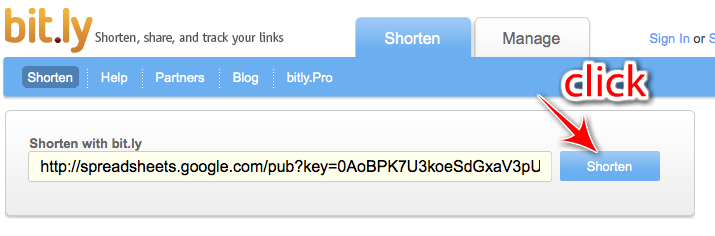
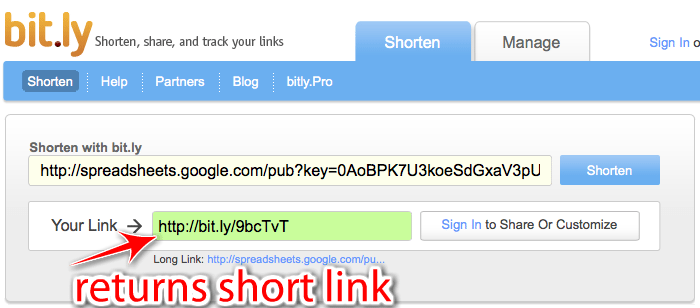
    • Google returns a very long link to the published document.  Use a URL shortener to shorten the link.  See instructions for Bit.ly below
    • Students then enter the (shortened) link into the URL window at the top of their browser.  They will be directed to the spreadsheet
    • Students are now able to access, create, and edit the document.
    • Your students are able to access and interact with the document at one time making it a truly collaborative effort.  Sit back and watch the document create itself.
    • Once the document is complete it can be used as a revision tool or may be used again in another subject such as math when covering data analysis and graphing.

    Bit.ly
    Copy and paste the link Google gives, to publish the website, into the Bit.ly website.  Click shorten.  Bit.ly will return a short, and more manageable, URL such as http://bit.ly/9pQV.  I’m sure you’ll agree that it’s much easier to remember the shortened URL.

    For those looking for an introductory lesson for the their new class next school year, a great way to get to know your class is to have them fill in this spreadsheet together: Class introduction spreadsheet.

  • Intro To Integrating Technology Into The Classroom Series: 10 Ways To Turn ‘Offline’ Classroom Activities ‘Online’

    [youtube=http://www.youtube.com/watch?v=_A-ZVCjfWf8]

    My next ten posts, not necessarily in chronological order, will be dedicated to giving real examples of how ‘offline’ activities can be turned into ‘online’ activities to enhanced student engagement, and encourage tech-shy educators to take their first steps in integrating technology into the classroom.

    Why is it important to integrate technology into the classroom?

    • Enhances student engagement
    • Your learners are growing up in a digital world
    • Relate to your students with your understanding of social media
    • Help to make the shift for teachers away from content deliverers to content facilitators
    • Help prepare your learners for a digital future
    • Create a truly collaborative environment
    • Make the world a smaller place i.e. flatten the classroom

    Hope you enjoy the series.  I will try to link everything I do to British Columbia’s Prescribed Learning Outcomes as much as possible.

  • Guest Post: Netbooks In The Classroom

    Thank you to @MissBartel for being the first guest blogger to appear on Roaming Educator. You can reach Miss Bartel at suzannebartel (at) gmail (dot) com.

    You can read the full article here: My Experience With Netbooks In The Classroom

    Here’s the blog friendly version of My Experience With Netbooks In The Classroom:

    Having a 30 netbooks in my classroom has increased not only my students engagement in learning but my own as well.  Seeing the students so excited about learning is inspiring. The netbooks have changed the way I teach and put ongoing professional development consistently at my fingertips.

    Here is a summary of some of my challenges, successes and suggestions from the past year:

    Challenges:

    • District Policy: My biggest challenge with the netbooks has been having to go through our District Tech team for any changes and updates.  As tech is not a priority in my district, many of these roles have been cut and the tech budget has been discarded.  I wait up to 3/4 months just to have a ‘flash’ application added or updated on the netbooks.  I meet a lot of resistance in this area – when I have a problem (like the sluggishly slow wireless speed when all 30 computers are being used) that If know is easily fixed, I am told that there is no solution and no attempt is made to help out.  It would be great if the District was willing to give the ‘Tech Teacher’ on each staff the ability to make some of these simple changes.
    • Windows Updates: Window’s updates now need to be initiated by us on each computer and this takes a lot of time.  (this ties into the District Policy challenge)
    • Screen Size: Small screens make ‘artistic endeavours’ such as movie making or picture editing difficult.
    • Internet Expectations: Setting clear expectations of allowable websites for students and maintaining this expectation for all students.
    • Staff Buy-in: Although It’s wonderful having the netbooks in my classroom all the time, I would love to see other teachers embrace them as well.  It has been a challenge to gain staff acceptance of this new technology available to them.

    Greatest Successes

    • E-ngagelivewww.engagelive.net – I stumbled upon this website in my search for tips on teaching online safety.  Small groups of students interact through ’email like messages’ with ‘experts’ in the UK in regards to Internet Safety, Bullying and other topics like this.  I’ve never seen my class so engaged in reading, writing, collaborating and oral discussion with their peers.  An amazing experience!
    • Blogging with KidBlog – www.kidblog.org – A great place to host student blogs.  You can change the settings so that all comments/blogs must be approved by the teacher.  Very engaging for students.
    • Student Collaboration with Primary Pad – www.primarypad.com – I used Primary Pad as a collaboration tool with in my class as well as with a class in the UK.  The two classes were able to communicate and complete projects together using this website.
    • Professional Development
      • http://primarytech.globalteacher.org.au/tech-tools-for-teachers/ – This blog has a newsletter that you can sign up for that I have found extremely usefully.  Once a week they email you a newsletter about one web tool to use in your classroom.  It gives you step by step instructions that are easy to follow.  They’ve given me some great ideas for the classroom.
      • Twitter – I mentioned earlier, this is a great way to gain endless resources to use with your class.
    • Google Docswww.gmail.com Wow!  This has opened up my world of collaboration with students and colleagues!  I’ve used it to plan team teaching for engaging lesson with a colleague.  Students create their projects on here and then share them with me.  I edit student writing on Google docs, create online quizzes, teach data management using the forms, create online worksheets for students to complete – the possibilities are endless!
    • Other – other tools I’ve enjoyed using – Wordle, Voicethread, Rhyming Poetry, and Scratch (free animation creation software)


    Suggestions for schools interested in using Netbooks

    • Bandwidth – Consider that you will have 30 students using wireless internet at the same time and make sure you have enough bandwidth to make this feasible    .
    • Permission to Change Netbooks – Have a staff member who has admin permissions and is capable of installing simple programs onto the netbooks all at once (ie. Windows updates, flash, screen readers, and open-source software etc…
    • Student Passwords – Use simple passwords for students!  This is important for primary students
    • Transportation of Computers – House the netbooks on a portable cart so that they are easily transported around the school and can be easily charged at the same time.
    • Teacher Training – Give a school-wide workshop about basics in teaching students how to use the netbooks or have a staff member go around to each class and team teach to help encourage others to use netbooks.  Not all teachers are comfortable with new technology and need to be shown how to use the technology and why it will be useful in their classes.

  • 100% Engagement Using Wallwisher

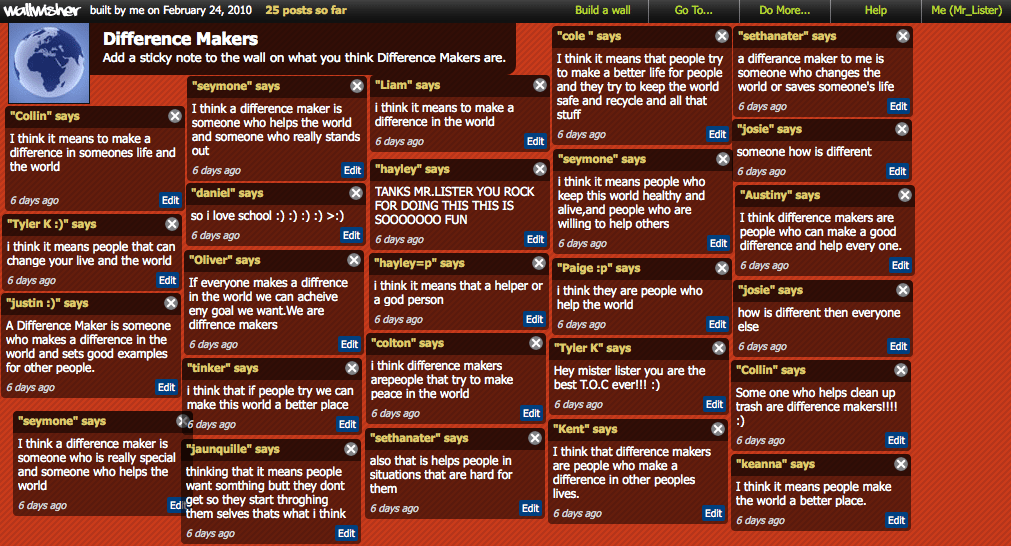
    After watching the Olympics on CTV I was thoroughly impressed with their segments on athlete’s ‘Difference Makers.’ These segments delved into the lives of Canadian athletes to discover the people behind the scenes who drive them to success and help athletes reach their lofty goals.

    I mirrored CTV’s  ‘Difference Makers’ but tailored it to my learners.  I lead them to think about significant people in their lives who have help them become the wonderful people they are today.

    This post talks about just one of the stages in this lesson.  Most of my learners hadn’t seen any of the ‘Difference Makers’ clips so I decided to write the statement ‘Difference Makers’ on the board and asked student to discuss its meaning in partners.  Normally I ask my learners to write their thoughts, ideas, or comments to the topic on sheets of large paper.  Often with mixed results.  However on this occasion I thought I’d try www.wallwisher.com.  I created a wallwisher page free of charge, named it difference makers, and created the conditions for students to post virtual sticky notes on a virtual classroom-board.  During the time my learners were posting I observed 100% engagement in the activity.  Had this been with pen and paper I doubt I would have experience the same kind of results.  You could argue that perhaps they were all engaged because it was new to them.  I guess only time will tell.

    What I like most about wallwisher is that it is customizable and allows the creator of the page to approve stickies before they appear on the wall.  This